Group Productivity
Report Parameters
|
Field |
Description |
|---|---|
|
Report Name |
The name of the report. |
|
Start Date |
The start date from when the data must be considered for generating the report. |
|
End Date |
The end date until when the data must be considered for generating the report. |
|
Groups |
Select the preferred groups for which the report must be generated. By default, the All option is selected, and the report will be generated for all groups. |
|
Category |
Select the preferred department categories that must be considered for revenue calculation in the report from the options available in the drop-down list. Users can select only a maximum of 10 categories from the available options. |
|
Sort Options |
Select the preferred criteria by which the data in the report must be sorted. Available options include the following:
By default, the Name option is selected. |
|
Include Group Member |
When selected, in addition to group master charges, the report will also include charges posted to other members in the group. |
|
Include Shoulder Dates |
By default, the flag will be disabled. |
Sample Report
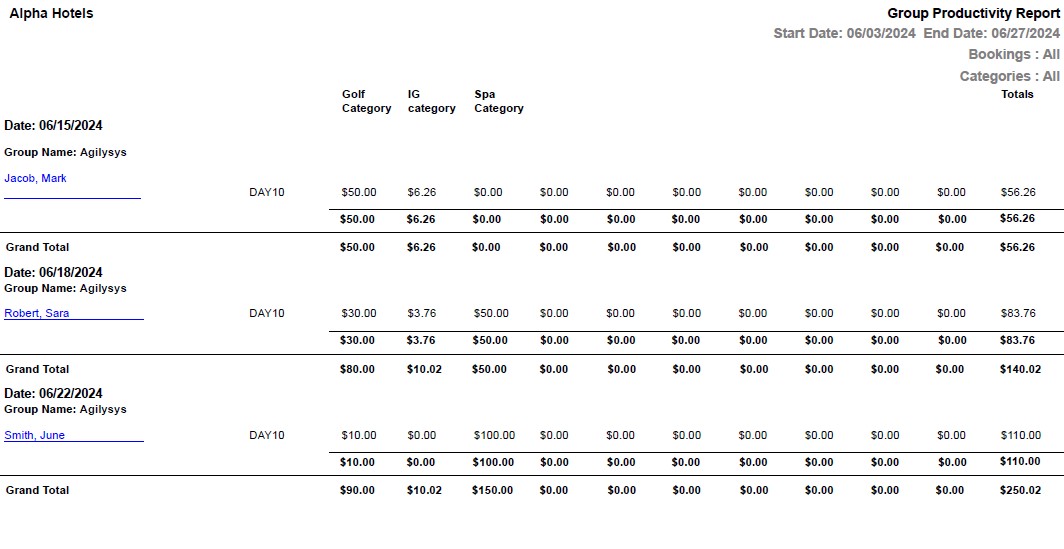
Report Fields
|
Field |
Description |
|---|---|
|
Group Name |
The booking name of the group. |
|
Date |
The group arrival date. |
|
Room Number |
The room number of the guest. |
|
Guest Name |
The name of the guest in the reservation will appear as a hyperlink and clicking it will navigate the user to the guest record. The reservations in the Checked Out status will not be considered. |
|
Total |
The total revenue for the day from all folios. |
|
Grand Total |
The total revenue from all groups for the selected date range. |